
GlobalBizSight CompanyWatch Q&A: OpenAI Turns ChatGPT Into a GIF Generator with Images 2.6
Yes—OpenAI has made ChatGPT a native GIF generator in a single conversation, adding frame editing and playback controls as Images 2.6 rolls out to ChatGPT and Codex. The upgrade matters because it lowers the production floor for animation, while its API split into two models gives teams faster and more visual options.
What exactly changed in ChatGPT GIF creation?
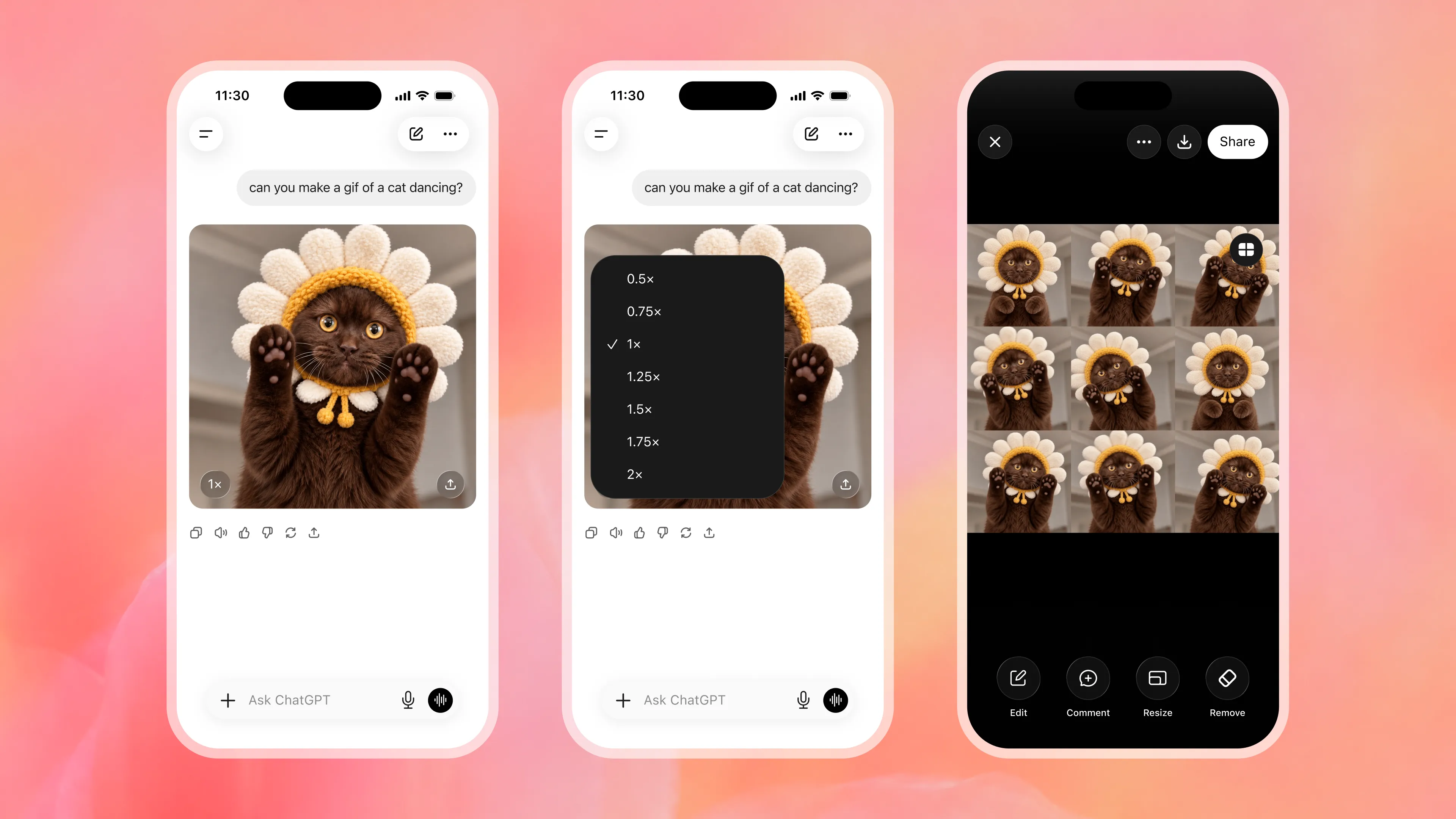
The practical change is that ChatGPT can now turn a prompt or uploaded photo into a looping GIF inside the same chat surface, with controls for animation speed and individual frames. OpenAI's example uses the request “Can you make an animated GIF of a dancing cat?” and shows that the user can review the result, retime it and share it without reassembling assets in a separate editor.
OpenAI's deployment materials frame the update as more than animation. The Images 2.6 system card states: “This release also adds GIF generation and photo markup in both ChatGPT and the API, plus SVG output support in the API.” That combination matters for teams that need to annotate images, export vector assets, or keep review threads inside the same tool.
Why does the more than 4 billion images weekly figure matter?
OpenAI reports users now generate more than 4 billion images every week through ChatGPT and its API, versus 3 billion images weekly in September this year. That is roughly a one-third increase in a short period, and it signals that visual generation is becoming routine rather than occasional.
From a company-watch view, the number is not just a traffic stat. It suggests OpenAI is using image work to deepen engagement: once a user has generated a still, they are closer to needing edits, formats, animation and export options. The GIF feature is therefore a product-architecture move, not merely a novelty format.
- Adoption signal: weekly volume shows image creation is already a default ChatGPT behavior.
- Platform signal: animation enters a product that began with text, then still images, now developer APIs.
- Competitive signal: rivals should be judged on controllability and workflow depth, not only image realism.
How should teams choose between GPT-Image-2.6 Flare and GPT-Image-2.6 Sunburst?
For developers, the update introduces a clear routing decision: OpenAI launched two API models, GPT-Image-2.6 Flare and GPT-Image-2.6 Sunburst. Flare is positioned for faster output, while Sunburst emphasizes higher visual quality. The useful team rule is to use Flare for breadth and speed, and Sunburst for depth and presentation.
| Decision dimension | GPT-Image-2.6 Flare | GPT-Image-2.6 Sunburst |
|---|---|---|
| Primary strength | Speed, low-latency iteration, draft volume | Detail, fidelity, brand-facing polish |
| Best for | social GIF drafts, product mockups, A/B testing, internal reviews | campaign hero visuals, investor materials, client deliverables, polished animations |
| Workflow role | First-pass generator | Final-pass enhancer |
| Main caution | May be insufficient for premium visual standards | Slower and potentially less economical at high scale |
Media coverage adds another practical dimension: Jiemian, citing OpenAI's launch information, says Images 2.6 improved generation speed versus the prior version by around 50% and that Flare could produce an image in as low as six seconds in a low-quality setting. Those numbers still require production testing under user load, but they strengthen the case for a speed-tier strategy.
Distribution is another important point. Images 2.6 and the GIF capability are rolling out to ChatGPT and Codex across web, desktop and mobile. Codex support is especially telling: it places image creation and editing closer to coding, review and build workflows, where developers may want annotated assets, quick mocks or SVG exports without leaving their development loop.
What does this mean for OpenAI's business position?
As a CompanyWatch event, this is a consolidation move. OpenAI is not only selling a better image model; it is pushing visual production into the default interface used by employees, creators and builders. The result is a stronger platform gravity: prompts, generated images, edited frames, markup, SVG exports and API calls can all be anchored around one vendor relationship.
The competitive risk is that simpler creative tools may be absorbed at the low end. If a marketing coordinator can generate, retime and edit a GIF in a chat window, they may no longer open a standalone editor. For enterprise teams, the bigger issue is governance: once animation is easy to make, policy, provenance, brand review and record-keeping become the bottleneck.
OpenAI's provenance work is relevant here. Its content-provenance materials describe making AI-generated media easier to recognize through C2PA and other signals. Businesses should test whether animated outputs inherit the same traceability expectations as still images before using GIFs in regulated or public-facing environments.
Which risks should decision-makers not overlook?
- Quality ceiling: GIF is lightweight and looping; it remains useful for reactions, product teasers and UI demos, but it is not a full motion-design replacement.
- Brand control: faster generation can multiply off-brand assets if prompts and templates are not governed.
- Compliance blind spots: uploads, likeness, IP and provenance checks need to be defined before teams scale usage.
- Cost and latency confusion: Flare and Sunburst serve different jobs; a single model choice may force teams to accept either speed or polish unnecessarily.
What are the most common misconceptions?
- Misconception: “A GIF means ChatGPT can make professional video.”
Reality: The feature supports short looping animation and frame-level editing, not complete timeline control or high-end motion graphics. - Misconception: “Native generation removes review steps.”
Reality: It reduces tool switching, but brand, privacy, copyright and provenance checks remain necessary. - Misconception: “Sunburst is just the paid option and Flare is the cheap option.”
Reality: They address different workflows. Teams should evaluate by use case, not subscription tier alone. - Misconception: “More images per week automatically proves stronger monetization.”
Reality: Adoption volume shows usage growth, but revenue quality depends on plan mix, API consumption, enterprise retention and workflow stickiness.
What should investors, analysts and business teams watch next?
The next useful metrics are not simply whether users generate GIFs, but whether the feature becomes a workflow habit. For GlobalBizSight's CompanyWatch lens, the strongest signal would be a shift from novelty clicks to repeated editing, API integration and team adoption.
| Tracking metric | What it suggests | Decision implication |
|---|---|---|
| GIF creation and re-edit rate | Users see ChatGPT as an animation workspace, not a one-click novelty | Expand creative automation pilots |
| API usage split between Flare and Sunburst | Developers are formalizing speed-vs-quality routing | Build internal model-router policies |
| Share of outputs from uploaded photos | Teams are using ChatGPT to animate real assets, not only synthetic scenes | Prioritize rights and provenance controls |
| Adoption inside Codex workflows | Visual creation is moving into engineering and product development | Expect stronger competition with design handoff tools |
FAQ: Quick answers for decision-makers
Is ChatGPT's GIF generation native or a wrapper around third-party tools?
OpenAI presents it as a native capability: a user can ask for a GIF in one chat, then adjust playback speed and inspect frames. Earlier ChatGPT workflows could assist with GIFs through code or external steps, but the updated model is intended to produce the animation directly.
Can I upload a photo and make a GIF from it?
Yes. The reported launch supports GIFs from text prompts or uploaded photos, making it more useful for product images, screenshots, characters and simple motion effects.
Which API model should a developer pick first?
Start with Flare for high-frequency drafts, low-latency previews and batch experiments. Use Sunburst when the deliverable needs tighter visual quality. A practical pattern is Flare for drafts and Sunburst for finals.
Does this signal a broader platform shift?
Yes. Because Images 2.6 is being pushed across ChatGPT, Codex and mobile surfaces, while the API receives two named models, OpenAI is aligning creation, editing and developer integration inside one ecosystem.
Reference sources
- OpenAI, Introducing Images 2.6, openai.com.
- OpenAI Deployment Safety Hub, ChatGPT Images 2.6 System Card, deploymentsafety.openai.com.
- The Verge, ChatGPT will now make you animated GIFs, theverge.com.
- Jiemian, coverage of OpenAI Images 2.6 speed and API models, jiemian.com.
- OpenAI, Advancing content provenance for a safer, more transparent AI ecosystem, openai.com.